For decades, organizing a sports card collection meant flipping through heavy binders, manually typing card details into excel spreadsheets, and spending hours searching eBay to check individual prices.
If you had a collection of 500 cards, cataloging them and keeping their values updated was practically a full-time job.
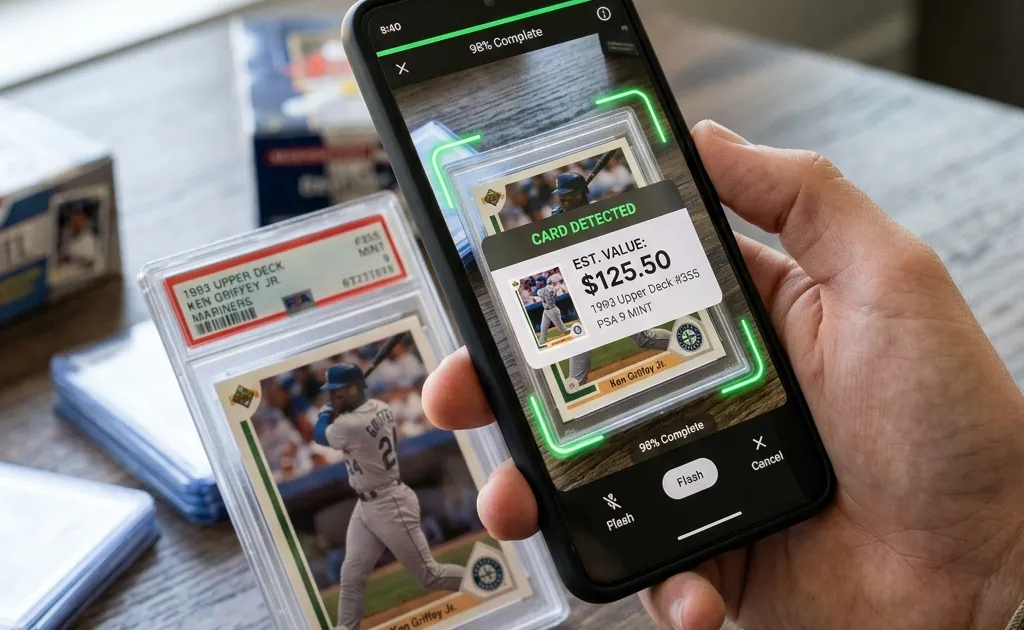
Fortunately, mobile technology has changed the hobby forever. Today, you can use a sports card scanner app to identify, value, and track your cards in seconds using just your smartphone camera.
Here is a step-by-step guide on how to get the most out of your card scanner app and build a digital portfolio of your collection.
Why Use a Sports Card Scanner?
Before diving into the steps, let’s look at the primary benefits of transitioning from spreadsheets to a digital card collection tracker:
- Speed: Scan and catalog up to 10 cards per minute, compared to taking minutes per card manually.
- Parallel Identification: Modern AI models can detect subtle visual differences between base cards and rare refractors or parallel cards.
- Live Appraisals: The app pulls live pricing feeds, meaning your collection’s total value updates automatically as market prices shift.
- Portability: Access your collection at card shows, hobby stores, or while trading with friends, directly from your pocket.
Step 1: Prepare Your Cards for Scanning
To get the fastest and most accurate results from a baseball card scanner or football card scanner, you want to set up a clean scanning environment.
- Lighting: Place your cards under bright, indirect natural light. Avoid harsh overhead lighting that creates reflections or hot-spot glare on plastic sleeves.
- Contrast base: Place the card on a plain, dark background (like a dark desk, table, or playmat). This helps the scanner’s edge-detection algorithm isolate the card borders instantly.
- Remove sleeves if needed: The scanner works perfectly through top-loaders and penny sleeves, but if you have a heavily scratched plastic case causing glare, removing the card temporarily will yield the highest recognition accuracy.
Step 2: Open the Scanner and Scan Your Card
Open your sports card app and tap the camera or scan icon. Position your phone directly over the card:
- Hold Steady: Keep your phone parallel to the card to prevent perspective distortion.
- Align with Guidelines: Place the card within the on-screen framing guide.
- Automatic Detection: The app will automatically detect the borders, auto-focus, and capture the image once it detects a stable frame.
In less than three seconds, the app’s AI processes the card’s visual features — matching the player photo, team logos, set design, and serial numbers against a database of millions of sports cards.
Step 3: Review the Identification & Select Parallels
Because card manufacturers release dozens of parallel variations of the same card (e.g., Panini Silver Prizm, Hyper Prizm, Green Prizm, Ruby Wave), the app will present you with the detected card details:
- Verify the player name, year, set, and card number.
- If the card is a specific parallel, select the correct version from the list. The app will show reference images of each variation to help you visually confirm.
- If the card is professionally graded, select the grading company (PSA, BGS, SGC) and input the grade number (e.g., PSA 9) to get the exact graded valuation.
Step 4: Add the Card to Your Digital Binder
Once confirmed, tap “Add to Collection”. You can organize your digital portfolio by creating custom binders or folders:
- Folder 1: “My Personal Collection (PC)”
- Folder 2: “Flipping / For Sale”
- Folder 3: “Raw Rookies to Grade”
As you add more cards, your dashboard will display key portfolio metrics, such as your total collection size, top-valued cards, and the combined market value of your entire inventory.
Maximize Your Hobby: Download Sports Card Scanner & Value
If you are ready to stop typing spreadsheet formulas and start scanning, download the Sports Card Scanner & Value app.
Available for both iOS and Android, it serves as an all-in-one sports card scanner, price checker, and collection tracker. Whether you collect baseball, basketball, or football cards, it provides everything you need to scan, appraise, and monitor your collection on the go.
Download it now from the App Store or Google Play Store!
Get Instant Sports Card Values
Download the Sports Card Scanner & Value app to instantly identify, catalog, and track your baseball, basketball, and football cards using your phone camera.