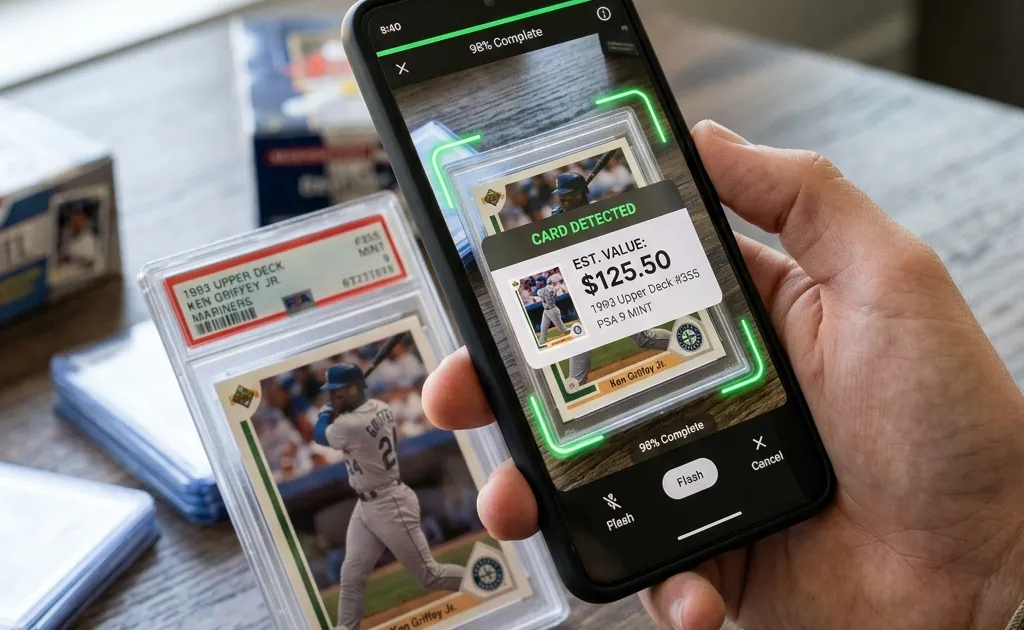
An online sports card scanner is useful when you want to identify a few cards without installing an app. A mobile app is usually the better fit when you plan to scan repeatedly, keep a collection, and return to saved cards later. Neither format removes the need to verify the year, set, card number, variation, condition, and comparable sales.
The important distinction is not simply “website versus app.” It is whether the tool supports the complete job you need to do: capture a usable image, suggest the correct card, show enough detail to verify the match, help with value research, and preserve your work in a form you can use again.
Quick decision table
| Your situation | Better starting point | Why | What to verify first |
|---|---|---|---|
| You found one unfamiliar card | Online scanner | Fast trial without committing to an install | Upload limits, image handling, and whether results include set and card number |
| You are sorting a box or collection | Mobile app | Repeated capture and collection workflows are easier to keep together | Batch workflow, export options, current feature limits, and account requirements |
| Your best card photos are on a computer | Online scanner | A browser can use files already stored on the device | Supported formats, maximum file size, and privacy policy |
| You scan at shows, shops, or trades | Mobile app | The phone camera and saved collection stay in one workflow | Connectivity needs, camera permissions, and how cards are saved |
| You do not want another account | It depends | Some browser tools and apps require sign-in; others do not | Whether processing or history works without an account |
| You need a formal appraisal | Neither | Identification and estimates are not certified appraisals | Use a qualified appraiser when documentation or expert opinion is required |
If you are still choosing a product, compare the current access limits and collection tools in our free sports card scanner app comparison. Features and pricing can change, so confirm them in the product’s current official listing rather than relying on an old review.
What “online” and “no download” actually mean
An online scanner normally runs in a web browser. Depending on the site, you may choose an existing image, take a new photo through the browser, or drag a file from a computer. The web platform supports selecting local files through the W3C File API and can request camera access through the W3C Media Capture and Streams specification. A browser must still ask for permission before a site can use a camera.
“No download required” means you do not install a native application. It does not automatically mean the image stays on your device, that no account is required, or that the service stores nothing. Before uploading a valuable or personally identifiable image, check:
- whether the image is processed on the device or sent to a server;
- how long uploaded images and results are retained;
- whether images may be used to improve a model or product;
- whether an account is required and how account deletion works;
- whether EXIF metadata or background details are removed;
- whether you can export or delete saved card records.
An installed app also needs a privacy review. The practical advantage of a browser is convenience, not an automatic privacy guarantee.
What an online sports card scanner can do well
1. Test whether scanning helps your workflow
A browser tool can be a low-friction way to test the basic idea. Photograph a small, representative group rather than one easy card. Include a modern base card, a foil or chrome card, an insert, a parallel, and an older card. A useful result should narrow the search beyond the player’s name.
Record whether the suggested match includes:
- player and team;
- release year;
- manufacturer and product line;
- set or insert name;
- card number;
- base, parallel, variation, autograph, or memorabilia status.
A result that identifies only the athlete is not enough for value research. Multiple cards can use the same player photograph or similar designs while representing different products and market values.
2. Work from images already on a computer
Collectors often have auction photos, inventory images, or scans from a flatbed scanner stored on a laptop. A browser workflow can make those files easier to test without first transferring them to a phone. Crop away unrelated background, keep the full card visible, and avoid resizing so aggressively that the card number or fine print becomes unreadable.
3. Handle occasional identification jobs
If you scan only a few cards each month, a website may be enough. You can use the suggested identity as a search query, verify the details on the physical card, and continue with a manual sports card value lookup. There may be little benefit in maintaining a dedicated collection app if you do not need saved inventory.
Where a mobile scanner app is usually stronger
Repeated capture
An app can keep the camera, review screen, and collection workflow in one place. That reduces context switching when you are processing many cards. The advantage is organizational rather than magical accuracy: a poor photograph or an ambiguous parallel can still produce a weak suggestion.
Collection history
Collectors who want to revisit cards need more than a one-time answer. Check whether the app can save the exact variation, condition notes, grade, acquisition information, personal tags, and images. Also check whether you can export your data. A collection that cannot be moved or backed up may create more work later.
A phone-first workflow away from home
At a shop or card show, the phone is already the capture device. A mobile app may therefore be more practical than opening a website, selecting a file, and repeating an upload flow. Test the app under the connectivity conditions you normally encounter; do not assume every feature works offline.
Our sports card scanner workflow explains how identification, verification, value research, and collection tracking fit together. You can also use the sport-specific starting points for baseball cards, basketball cards, and football cards.
A fair five-card test for any scanner
Do not compare an online tool and an app using different cards or different photos. Use one controlled worksheet.
| Test card | Why include it | Pass condition | Common failure |
|---|---|---|---|
| Modern flagship base card | Establishes an easier baseline | Correct year, product, and card number | Correct player but wrong year |
| Color or refractor-style parallel | Tests variation handling | Correct parallel name or a clear prompt to choose it | Base version selected automatically |
| Insert or short-print candidate | Tests non-base checklist recognition | Correct insert set and number | Main set suggested instead |
| Older or vintage card | Tests design and checklist coverage | Correct year and set, not just player | Nearby year or reprint confused with original |
| Graded card in a slab | Tests glare and obstruction | Card identity remains correct through the holder | Label or reflection dominates the image |
For each card, use the same front image in both tools. Then repeat with a deliberately harder image: slight glare, a sleeve, or a busier background. Record the result rather than relying on memory.
Score each field separately. A match can be correct on player and team but wrong on the product, number, or parallel. That distinction matters because value research depends on the exact card.
How to scan a card in a browser
Step 1: Prepare a useful photo
Place the card on a plain, contrasting surface. Use bright, indirect light and keep the camera parallel to the card. Show all four edges. If the card is in a reflective sleeve or slab, change the angle of the light rather than tilting the camera so far that the card becomes a trapezoid.
Step 2: Preserve identifying details
Do not crop away the card number, copyright line, set code, serial number, or grading label. Photograph the back as well, even if the tool accepts only one image. The back often provides the evidence needed to reject an incorrect match.
Step 3: Review permissions and upload terms
Grant only the permission needed for the current task. If you prefer not to allow live camera access, take a photo with the normal camera app and upload that file instead. Read the service’s current privacy information before submitting images.
Step 4: Treat the result as a candidate
Compare the proposed year, set, and number with the physical card. Check manufacturer logos, foil patterns, border colors, serial numbering, autograph wording, memorabilia windows, and fine print. If one field conflicts, search manually rather than forcing the candidate to fit.
Step 5: Research value separately
Identification and valuation are different tasks. Once you have a verified identity, compare several recent completed sales of the same card in similar condition. Separate raw cards from graded cards and compare the same grading company and grade when possible. Exclude active asking prices, lots, reprints, and different parallels.
The SportsCardValue methodology explains why an estimate is a research aid rather than a guaranteed sale price or certified appraisal.
Common reasons both formats fail
An online scanner and a mobile app can struggle for the same underlying reasons:
- glare hides the card number, surface pattern, or border;
- the image is soft because the camera focused on a sleeve or slab;
- only part of the card is visible;
- a parallel differs from the base card only by subtle foil or a small serial number;
- the back image is missing;
- the card is a reprint, custom card, altered card, or obscure regional issue;
- the relevant checklist or reference image is unavailable;
- two cards share very similar designs.
When a scan is uncertain, do not upload the same poor image repeatedly. Improve the evidence: clean the outside of the holder, change the light, capture front and back, and search the printed number with the player and manufacturer. The refreshed guide to scanning sports cards with better photos provides a detailed troubleshooting checklist.
Which option should you choose?
Choose an online scanner when you want a quick test, already have images on a computer, scan infrequently, or do not need a persistent collection. Choose a mobile app when scanning is a repeated habit, you want your records in one place, or you need a phone-first workflow while buying, selling, or trading.
Whichever route you use, judge the tool by the same standard: does it help you reach a verifiable identity with less work? A useful scanner should make the next search more precise. It should not persuade you to skip the physical details that separate a base card from a valuable variation.
Start with a small test set, keep your worksheet, and choose the workflow that produces the fewest unresolved fields—not the one that produces the fastest-looking answer.
Identify and Research Your Sports Cards
Download the Sports Card Scanner & Value app to identify, catalog, and track baseball, basketball, and football cards. Confirm the exact card and condition before relying on an estimate.